Excel Errors and How to Fix Them
Most common errors in Excel:
#DIV/0!
#VALUE!
#####
#NULL!
#NUM!
#NAME?
#REF!
#N/A
#DIV/0!
Reason: Dividing by zero or an empty cell.

How to Fix: Replace zero (or empty cell) with correct value.
#VALUE!
Reason: Data contains text (invalid type).

How to Fix: Replace text with (number) correct value.
#####
Reason: Column width is too small.

How to Fix: Extend column width to fit cell value.
#NULL!
Reason: Invalid range syntax.

How to Fix: Update cell range with the correct separator.
#NUM!
Reason: Invalid numeric data.

How to Fix: Check data or formulas to correct invalid numeric value.
#NAME?
Reason: Incorrect formula name/spelling.

How to Fix: Check spelling of formula name, or use insert function to lookup correct formula name.
#REF!
Reason: Cell reference does not exist.
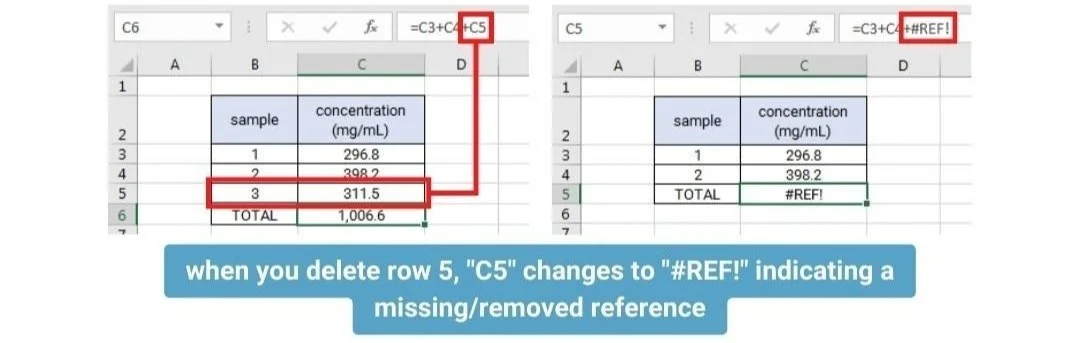
How to Fix: Update the formula or click undo (Ctrl + Z) if data was accidentally deleted.
#N/A
Reason: Value was not found in the data.
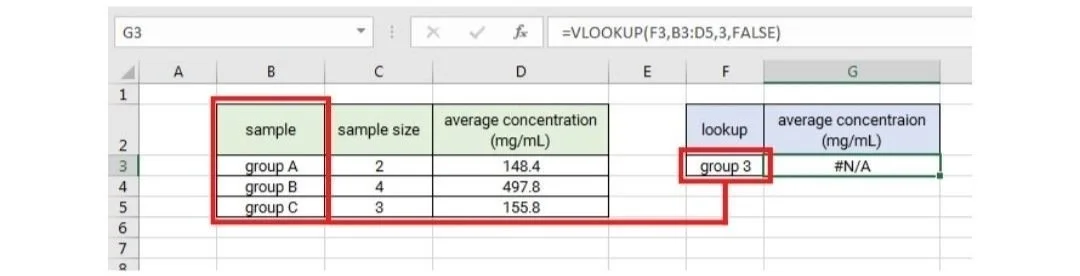
How to Fix: Check that the lookup value is in the data or that the lookup value entered is correct (i.e. group C instead of group 3).
[Download Now: Free Time-Saving Excel Shortcuts]
Do you have any questions or suggestions? Feel free to reach us by clicking here.
Get free pharmaceutical analytical calculation examples, Excel tools, and articles delivered to your inbox.