USP <711> Dissolution Stage Testing Explained (+ Excel Calculator for Stage 1, 2, and 3 Testing)
Dissolution testing plays a vital role in the pharmaceutical industry, serving as a critical step in the development and quality control of dosage forms. This testing enables the evaluation of both the rate and extent of drug release from a formulated product.
To comply with dissolution requirements, the quantity of active ingredient dissolved from the tested dosage units must align with the specifications provided in USP <711>. It is imperative to conduct testing across all three stages unless the results conform at either S1 or S2.
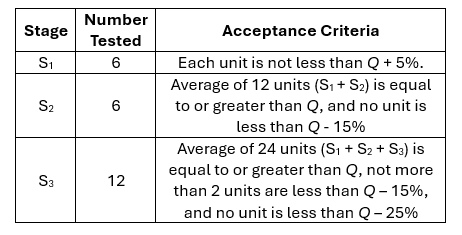
Reference: USP <711> Dissolution
To streamline calculations for stage testing, we have developed a template that determines whether your data meets the USP <711> dissolution guidance. By entering the dissolution data and the corresponding Q values, the template will indicate whether each stage has passed or failed. This tool simplifies the process and ensures adherence to regulatory standards.
Stage 1
Input the dissolution time points in the "Time" column and the corresponding % dissolved values for each of the six individual dissolution vessels in columns labeled 1 through 6. In the "Q" column, enter the targeted amount of active substance, expressed as a percentage of the label claim, that should dissolve within a specified time. The template will automatically calculate Q+5% and display the result in the "Result" column, indicating whether the data passes or fails.

Stage 2
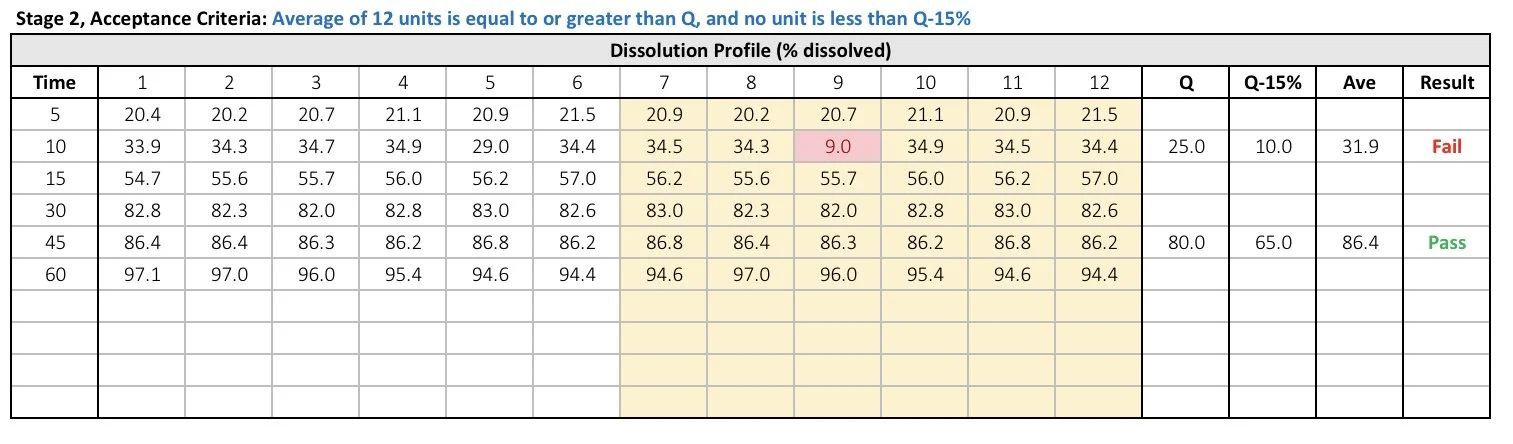
In the event that the generated data fails Stage 1, an additional six replicates must be performed. Record the new dissolution data in columns 7 through 12. The template will automatically copy the data from Stage 1 in columns 1 through 6. The template will also calculate Q-15% and the average. Furthermore, it will indicate whether the data has passed or failed the Stage 2 testing, as per USP <711>.
Stage 3
If the data continues to fail Stage 2 testing, additional 12 replicates must be performed. The template will automatically transfer data from both Stage 1 and Stage 2 testing to the new table. Enter the new dissolution data in columns 13 through 24. The template will calculate Q-15%, Q-25%, and the average. The template will indicate whether the data passed or failed Stage 3 testing according to the USP <711>.

Feeling overwhelmed? Simplify the process with our dissolution stage testing template. Quickly perform these calculations and make your life easier!
Do you have any questions or suggestions? Feel free to reach us by clicking here.
Frequently Asked Questions
-
“Q” represents the percentage of the labeled active ingredient that must dissolve within a specified time period according to regulatory specifications.
-
USP <711> dissolution testing generally includes three stages:
Stage 1 (S1)
Stage 2 (S2)
Stage 3 (S3)
Testing may stop early if acceptance criteria are met at S1 or S2.
-
In Stage 1:
Six dosage units are tested.
Each unit must meet the required dissolution criteria, typically Q + 5%.
If all six units pass, testing ends successfully.
-
If Stage 1 fails:
An additional six dosage units are tested in Stage 2.
The combined average and individual results are evaluated against USP <711> acceptance criteria.
-
For Stage 2:
A total of 12 units are evaluated.
The average of all units must be equal to or greater than Q.
No individual unit should fall below Q − 15%.
-
If Stage 2 still fails:
Twelve more units are tested, resulting in 24 total units.
Additional limits such as Q − 25% are evaluated alongside the overall average.
-
Testing may stop:
After Stage 1 if all criteria are met.
After Stage 2 if Stage 2 criteria are satisfied.
Stage 3 is only required if Stage 2 fails.
Get free pharmaceutical analytical calculation examples, Excel tools, and articles delivered to your inbox.