
EXCEL ADD-IN FOR PHARMACEUTICAL SCIENTISTS
Your dissolution calculations, done right inside Excel.
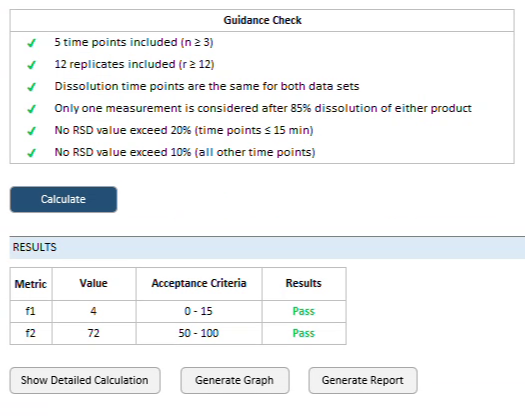
Compare dissolution profiles with f1 and f2, run USP <711> stage testing, and work through everyday calculations with ready-made templates. Every tool checks your data against the guidance and shows each step. Your data never leaves your computer.
Microsoft 365 · Windows desktop · Runs offline · 30-day money-back guarantee
FEATURES
01
Locked formulas
Formulas that can’t be edited by accident. You enter data; it calculates.
02
Guidance built-in
Each tool checks your data against the guidance and criteria it follows and flags what fails, with the reasons explained.
03
Stays in your workbook
Save datasets to a database inside your workbook. Your data stays in your computer and it works offline.
04
Clear results
Results shown against the acceptance criteria, with an explanation of what failed.
Integrated Solutions for Complex Needs
We align technical insight with disciplined execution to provide measurable gains across operational, financial, and strategic domains.
HOW IT WORKS
Three steps, all inside Excel.
Install and sign in.
Download the add-in, sign in, and the Dissolution Analytics tab appears on your Excel ribbon.
Pick a tool and enter your data.
Choose f1/f2, Stage Testing or any of the available templates. Type or paste your results, or load a dataset saved in your workbook.
Get a result you can check.
See the result against the criteria, every calculation step, and what failed and why. Print the report.
Integrated Solutions for Complex Needs
We align technical insight with disciplined execution to provide measurable gains across operational, financial, and strategic domains.
Questions
-
Microsoft 365 on Windows desktop. Some company computers block add-ins; if yours does, your IT team can approve it.
-
The full add-in with all features, for 7 days, starting when you first log in. No payment details needed.
-
Yes. All calculations run on your computer. Your data is never uploaded to our servers.
-
Each plan includes a set number of user licenses: 1, 5 or 10. One license per person. For more licenses, contact us.
-
Yes, please do. Email support@excel-in-science.com with what you’d like the add-in to do. We review every request when planning each quarterly update.
-
Email us within 30 days of purchase for a full refund, no questions asked.
Try it with your own data.
Get 7 days free. We’ll email your login and download link within a few minutes.
Ready to buy? See plans and pricing →